

 Facebook
 Twitter
 LinkedIn

Problem: Plain text emails lack personality
Email is a primary communication tool but plain text messages can feel flat and impersonal. Expressing humor, enthusiasm, or empathy through words alone is difficult. Important messages get overlooked in crowded inboxes because they all look the same. Adding visual elements like GIFs and stickers makes your emails stand out and helps convey tone and emotion clearly.
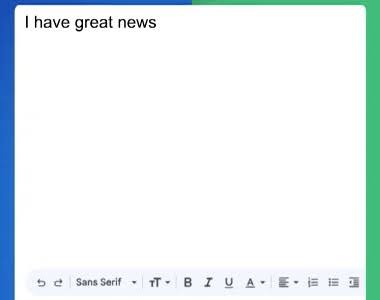
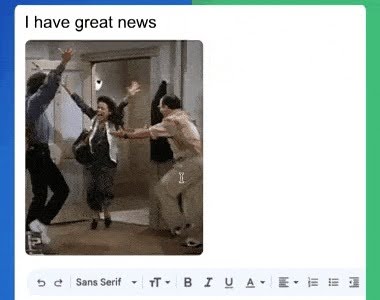
Solution: Email GIFs
Email GIFs by cloudHQ lets you search and insert GIFs and stickers directly into your Gmail compose window. It gives you instant access to trending, categorized, and searchable visual content. Whether you are celebrating a team win, lightening up a conversation, or making a point with humor, the right GIF is always one click away.
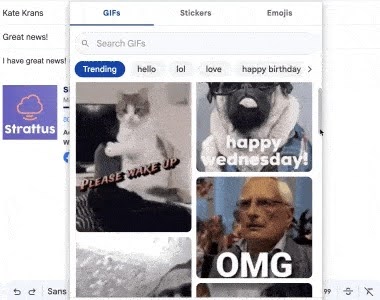
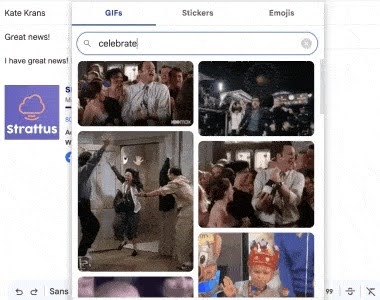
Search and browse thousands of GIFs
Find the perfect GIF instantly using the built-in search powered. Browse trending GIFs and stickers or search by keyword to find exactly what you need. Categories make it easy to discover content for any mood or occasion. The extension remembers your last search so you can pick up right where you left off.
One-click insertion into your email
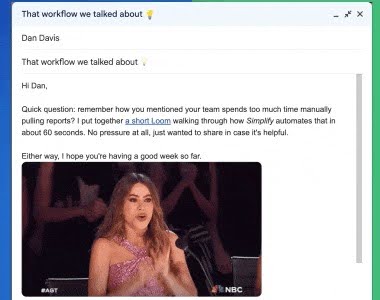
Inserting a GIF or sticker takes just one click. Select the visual you want and it is placed directly into your email body at the cursor position. There is no need to download files, copy URLs, or drag and drop images. The process is fast and seamless so you can keep composing without interruption.
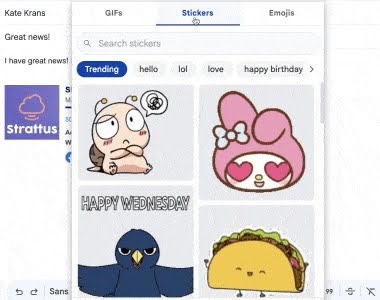
Stickers for every occasion
Beyond animated GIFs, you also get access to a library of stickers. Use stickers to add fun, expressive visuals to your emails without the file size of full animations. Stickers are perfect for quick reactions, greetings, and casual conversations that benefit from a visual touch.
Make your emails memorable
Emails with visual content get more attention and are more likely to be remembered. A well-chosen GIF can reinforce your message, break up long text, or simply bring a smile. Whether you are writing to a colleague, a client, or a friend, adding GIFs and stickers makes your communication more engaging and human.
Enable or disable per account
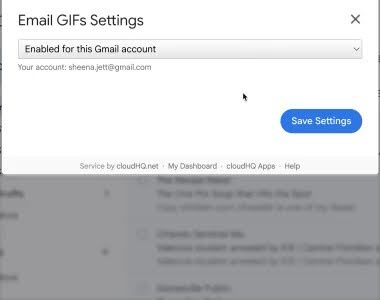
You have full control over when the GIF button appears. Enable or disable the extension for specific Gmail accounts through the settings menu. This is useful if you want GIFs available on your personal account but hidden on a work account. Your preferences are saved and remembered across sessions.
How to Pin the Extension to Chrome Browser
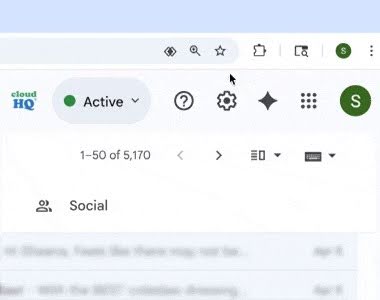
For quick access, you can pin Email GIFs directly to your Chrome toolbar so it is always one click away.
Open Chrome and click the Extensions icon at the top right of your browser. Find Email GIFs in the list, then click the pin icon next to it. The extension will now appear permanently in your toolbar.
Once pinned, you can access settings and manage the extension without opening menus. This keeps your workflow smooth while composing emails.
Works directly inside Gmail
Email GIFs works right where you write your emails. A small GIF button appears in the Gmail compose toolbar and opens a picker panel without leaving your inbox. There is nothing new to learn and no separate app to open. It fits naturally into your existing email workflow.
5 Star Positive Reviews
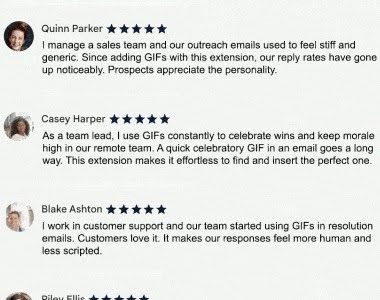
Users love how Email GIFs makes their emails more expressive and engaging. Customers highlight how easy it is to search, browse, and insert GIFs without leaving Gmail. Professionals and casual users alike appreciate the ability to add personality to their messages with just one click. From team celebrations to friendly check-ins, people rely onEmail GIFs to make every email count.
Here's what some of them have to say:
Benefits
Email GIFs is perfect for anyone who wants to make their emails more engaging and expressive. It helps teams celebrate wins, sales reps build rapport with prospects, and individuals add warmth to everyday conversations. With a massive library of GIFs and stickers powered by KLIPY, finding the right visual takes seconds. One-click insertion means you never lose your composing flow. Whether you use Gmail for work or personal communication, adding visual content makes your messages more memorable and enjoyable to read.
Here are just a few ways people use Email GIFs every day:

Sales Professionals
Add a personal touch to outreach emails and follow-ups to build rapport and stand out in crowded inboxes.
Marketing Teams
Make internal updates and campaign announcements more engaging with relevant GIFs and stickers.


Team Leads and Managers
Celebrate team achievements, birthdays, and milestones with fun visuals that boost morale.
Customer Support Teams
Add friendly GIFs to support replies to create a warmer and more approachable experience for customers.


Recruiters and HR
Make offer letters, welcome emails, and team announcements more personable and exciting.
Freelancers and Consultants
Stand out from other professionals by adding personality and warmth to client communications.

Educators and Students
Make class communications, group project emails, and announcements more fun and engaging.
Small Business Owners
Add character to newsletters, thank-you emails, and customer outreach with expressive visuals.


Remote and Hybrid Teams
Bridge the gap of remote communication by adding humor and emotion to everyday email conversations.
Personal Use
Make emails to friends and family more fun with GIFs for birthdays, holidays, congratulations, and everyday moments.

Frequently Asked Questions
How do I insert a GIF into a Gmail email?
Where do the GIFs and stickers come from?
Will the recipient see the GIF animation in their email?
Can I disable the GIF button for certain Gmail accounts?
Is there a limit on how many GIFs I can insert?
Do I need any technical setup?
Testimonials
“I manage a sales team and our outreach emails used to feel stiff and generic. Since adding GIFs with this extension, our reply rates have gone up noticeably. Prospects appreciate the personality and it makes our follow-ups feel less like templates.”
- Jessica Patel, Sales Manager
“As a team lead, I use GIFs constantly to celebrate wins and keep morale high in our remote team. A quick celebratory GIF in an email goes a long way. This extension makes it effortless to find and insert the perfect one.”
- David Chen, Engineering Team Lead
“I work in customer support and our team started using GIFs in resolution emails. Customers love it. It makes our responses feel more human and less scripted. The search feature makes finding the right GIF incredibly fast.”
- Sarah Mitchell, Customer Support Lead
“I send dozens of emails a day to clients and colleagues. This extension has completely changed how I communicate over email. A well-placed GIF can convey what paragraphs of text cannot. I cannot imagine going back to plain text emails.”
- Marcus Williams, Business Consultant
“Our HR team uses this for welcome emails, birthday messages, and team announcements. It adds so much warmth to what would otherwise be routine communications. The sticker library is a great bonus too.”
- Emily Rodriguez, HR Coordinator